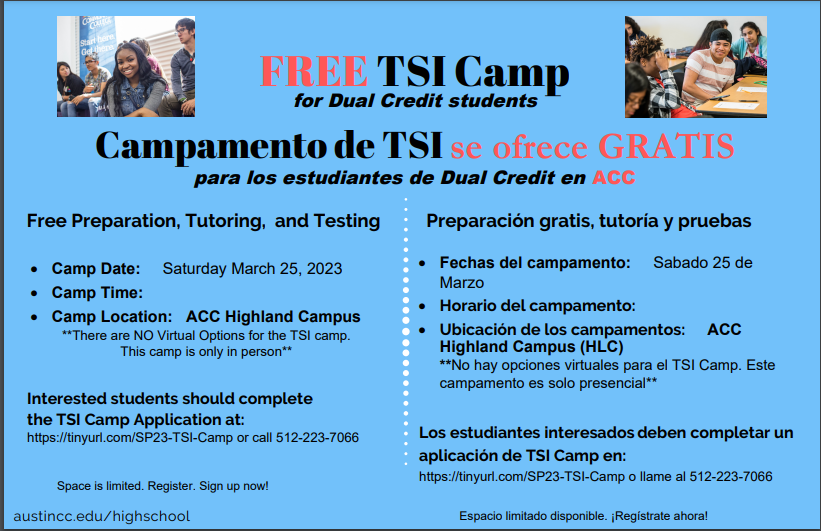

Dual Credit programs offer high school students the opportunity to earn college and high school credit simultaneously before they receive their high school diploma. Talk to your JHS Academic Counselor to discuss your options.
Benefits of the program:
- Enhances the ability and skills to do college-level work and aids students in gaining confidence for college success
- Students may earn enough credit to gain advanced standing when admitted to college full-time and are entitled to register earlier for classes
- Save money by receiving free or reduced cost college credit and shorten the amount of time, after high school, required to complete at college
- Research shows Dual Credit students are more likely to finish college and earn more credits by the 2nd year of college

ACC DC Enrollment Process:
- Look over the Approved ACC Dual Credit and Concurrent Enrollment Classes information.
- Students need to show college readiness through the TSI, SAT, or ACT exams before starting this process.
- The student needs to meet with their academic counselor to go over interested classes.
- Once the student has spoken with their JHS academic counselor and notified the counselor of the interested classes the information will be sent to the ACC campus. Once the student is cleared the student will be able to sign up for the classes.
- Complete the Application Steps and Checklist
- Students will be required to provide a valid email address for their parent/legal guardian, which will trigger an email to be sent to their parent/legal guardian. The parent/legal guardian will review the student’s electronic Early Admissions (EA) Contract and provide their approval via e-signature. Once completed, a final email with an embedded verification link will be sent to the parent/legal guardian and, once confirmed, the student’s admission application will be finalized and submitted.
- Students are responsible for following through with ACC emails, ACC's next steps, signing up for classes, and paying the textbook fee.
In order to get you registered for ACC course(s) at JHS, you need to:
1. Complete and submit your ACC Dual Credit Application
2. Activate your ACCeID (once received)
3. Complete the Online Orientation & Quiz (wait 4 hours after activating ACCeID)
4. Activate your ACCMail (wait 24 hours after activating ACCeID)
1. Complete and submit your ACC Dual Credit Application
2. Activate your ACCeID (once received)
3. Complete the Online Orientation & Quiz (wait 4 hours after activating ACCeID)
4. Activate your ACCMail (wait 24 hours after activating ACCeID)
Steps for registering for classes:
Once you choose a section, you can register for the class via your MyACC account. Here is a video that will walk you through the registration process and here are some text instructions as well:
- Log into your MyACC account
- Click Student Planning to search for courses, plan, and register.
- Click Go to My Progress or click the appropriate program. NOTE: If you have more than one academic program, click the directional arrow to view the appropriate program.
- To plan a course, click a course you have not yet started or a course recommended by your advisor.
- Using the menu on the left, you can filter the course section by availability, location, term, day of week, etc.
- Click View Available Sections.
- Locate the course section that fits your schedule. Click Add Section to Schedule.
- Read section details, then click Add Course to Schedule. NOTE: At the top of your screen, you’ll see a brief message indicating your course has been added.
- To plan a course not listed in My Progress or on your degree plan, use the Search for Courses box. Enter the ACC course ID. For multiple courses, separate each course by a comma (ex: EDUC-1300, ENGL-1301, MATH-1314), then hit Enter. NOTE: To add more classes, repeat Steps #8–#10.
- Go to Student Planning tab (Mobile users: On the upper left drop down menu, choose Academics, then Student Planning) and select Plan & Schedule. The planned courses will be listed in yellow. NOTE: Use directional arrows to ensure that you are planning for the correct semester.
- Click either:
- Register for each course individually or
- Register Now to register for all courses at once
- Register for each course individually or
Click on links below:
Steps to Enroll
Dual Credit Forms
ACC Application Steps
ACC Set Up
Hays CISD Approved Dual Credit Courses
Student Resources
Steps to Enroll
Dual Credit Forms
ACC Application Steps
ACC Set Up
Hays CISD Approved Dual Credit Courses
Student Resources
To withdraw from a class at Austin Community College (ACC), you can follow these steps: You would do this ONLY after you have talked to your High School Academic Counselor first.
- Login to MyACC.
- Under Registration & Payments click Withdraw from Classes.
- Under the Registration header, find Student Withdraw/Drop
- Select the correct term in the dropdown menu.
- Click Submit. Your classes will appear.
- Select the class or classes you wish to drop.
- Click Submit.
- Confirm that you have selected the correct class or classes.
- Select your reason for dropping in the Withdraw/Drop Reason dropdown menu.
- Click Submit.